


Imagine a customer fills out your website’s quote form and hits submit, but you never receive the email, and you lose the customer. Frustrating, right? But this happens to businesses far more often than you think.
You might only find out days or even weeks later when you check your website’s form submission logs, or when a customer gets in touch because they didn’t receive their invoice or password reset.
If this sounds familiar, your website’s emails probably aren’t getting through. The good news is there’s a straightforward fix. Setting up a dedicated Simple Mail Transfer Protocol (SMTP) email delivery service means all of the emails sent from your website actually reach the recipient’s inbox.
Why your website’s default setup is failing
The problem: Website platforms aren’t email platforms
By default, website platforms like WordPress and WooCommerce aren’t set up to send emails in a way that mail providers trust.
When a form is submitted or an order is placed, your website usually sends the email straight from your web hosting server, not from a proper email account. You may experience the following problems with this approach:
- Web hosting servers are built to run your website, not to deliver emails. They don’t have the tools and configuration needed to prove they’re a trusted sender.
- If your website shares a server with others, and one of those websites sends spam emails, your emails can get blocked, too.
This means emails from your website often end up in spam folders, or don’t arrive at all. Beyond frustrated customers, you could be missing out on leads and sales without realising.
The solution: Set up an SMTP service
The solution is to use SMTP, a standard way for websites to reliably send emails.
Instead of forcing your web host to act as a makeshift mailman, connect your website to a dedicated SMTP email delivery service.
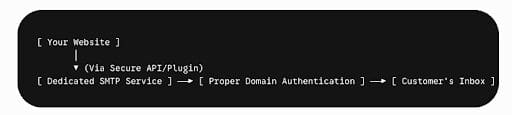
With a dedicated service, when your website sends an email, it routes it through that provider’s purpose-built email system. When you set up this type of service, there are a few small steps to go through to verify that you own your domain name and are authorising the website to send emails using that domain.
Your emails from the website are therefore trusted by the recipient’s mail server and will go straight to the inbox rather than being flagged as spam.
Why you shouldn’t connect your website to your actual mailbox
Some people try to fix email issues by connecting their website directly to their main business email account. This means that instead of using an SMTP service and connecting it to the website, they will connect the website to their actual mailbox used for general emails (such as in Outlook).
This might work for a while, but it can cause problems down the track. For example, if you update your business or change your email password, your website’s emails can stop working until you update the settings. Major platforms like Microsoft 365 and Google Workspace frequently disconnect these direct, old-school application logins every 6 to 12 months, requiring tedious manual reconnection.
By comparison, a dedicated SMTP service operates independently of your actual email accounts. You don’t need to buy extra licenses or set up new mailboxes, and your website keeps sending emails even if you change your main email password.
How SMTP services authenticate your domain
Getting your emails delivered comes down to trust and proper setup. Using a dedicated SMTP service, we set up three key “DNS records” under your domain name settings. These records act like a digital passport, showing inbox providers that your emails are genuine and safe to deliver.
- SPF (Sender Policy Framework): This tells the world which email service(s) are allowed to send emails from your domain. This record may include multiple services, such as your email provider and your mailing list platform.
- DKIM (DomainKeys Identified Mail): This adds a digital signature to your emails, proving they haven’t been tampered with on the way to your customers.
- DMARC (Domain-based Message Authentication, Reporting, and Conformance): This sets the rules for what happens when someone tries to send fake emails from your domain, helping protect your reputation.
Transactional vs. Marketing
It’s important to keep your website’s automated emails (such as invoices and contact form alerts) separate from your marketing emails (such as newsletters).
If you use your marketing newsletter platform’s main IP address to send website notifications through your marketing email system, your important emails could get blocked if someone marks a newsletter as spam. Keeping them separate protects your business emails.
Without this separation, you are completely in the dark. If a user claims they never received an order confirmation, you have no way to verify it. A dedicated SMTP service grants you a data-driven superpower: live analytics and delivery logs.
You can log into a dashboard and see the exact second an email was sent, whether it was delivered, or if there was a problem. This makes it much easier to solve customer issues. Setting up this tracking does not require advanced programming or custom coding. Most modern platforms rely on a simple bridge to connect your site to the delivery provider:
- Choose a provider: There are plenty of reliable options, such as SMTP2GO, Postmark, and SendGrid.
- Install a plugin: For WordPress, just add a plugin like Gravity SMTP, WP Mail SMTP, or FluentSMTP.
- Use API keys instead of passwords. An API key is a unique string of characters that never changes, keeping your connection secure. It also means you don’t have to update settings if your mailbox or account password changes.
Minimal cost for maximum peace of mind
The good news is that setting up a dedicated SMTP service is very affordable. Most providers offer free plans for smaller sites, and even the paid options usually start at $10 to $15 USD per month.
If your website sends thousands of emails each month, it means your business is active and reaching people. Making sure those important messages actually land in your customers’ inboxes by setting up an SMTP delivery service is a small but vital investment for any business that wants to keep growing.
Switching to a dedicated SMTP service means your emails get delivered reliably to your customers. If this is all over your head and you’d rather outsource the technical stuff, get in touch with our team today.